

Practice Test for Associate-Developer-Apache-Spark-3.5 Certification Real 2026 Mock Exam
Prepare For Realistic Associate-Developer-Apache-Spark-3.5 Dumps PDF - 100% Passing Guarantee
NEW QUESTION # 77
A Spark engineer must select an appropriate deployment mode for the Spark jobs.
What is the benefit of using cluster mode in Apache Spark™?
- A. In cluster mode, the driver is responsible for executing all tasks locally without distributing them across the worker nodes.
- B. In cluster mode, the driver program runs on one of the worker nodes, allowing the application to fully utilize the distributed resources of the cluster.
- C. In cluster mode, resources are allocated from a resource manager on the cluster, enabling better performance and scalability for large jobs
- D. In cluster mode, the driver runs on the client machine, which can limit the application's ability to handle large datasets efficiently.
Answer: B
Explanation:
Comprehensive and Detailed Explanation From Exact Extract:
In Apache Spark's cluster mode:
"The driver program runs on the cluster's worker node instead of the client's local machine. This allows the driver to be close to the data and other executors, reducing network overhead and improving fault tolerance for production jobs." (Source: Apache Spark documentation -Cluster Mode Overview) This deployment is ideal for production environments where the job is submitted from a gateway node, and Spark manages the driver lifecycle on the cluster itself.
Option A is partially true but less specific than D.
Option B is incorrect: the driver never executes all tasks; executors handle distributed tasks.
Option C describes client mode, not cluster mode.
NEW QUESTION # 78
A data analyst builds a Spark application to analyze finance data and performs the following operations: filter, select, groupBy, and coalesce.
Which operation results in a shuffle?
- A. select
- B. coalesce
- C. filter
- D. groupBy
Answer: D
Explanation:
The groupBy() operation causes a shuffle because it requires all values for a specific key to be brought together, which may involve moving data across partitions.
In contrast:
filter() and select() are narrow transformations and do not cause shuffles.
coalesce() tries to reduce the number of partitions and avoids shuffling by moving data to fewer partitions without a full shuffle (unlike repartition()).
NEW QUESTION # 79
Given a CSV file with the content:
And the following code:
from pyspark.sql.types import *
schema = StructType([
StructField("name", StringType()),
StructField("age", IntegerType())
])
spark.read.schema(schema).csv(path).collect()
What is the resulting output?
- A. [Row(name='alladin', age=20)]
- B. [Row(name='bambi'), Row(name='alladin', age=20)]
- C. [Row(name='bambi', age=None), Row(name='alladin', age=20)]
- D. The code throws an error due to a schema mismatch.
Answer: C
Explanation:
Comprehensive and Detailed Explanation From Exact Extract:
In Spark, when a CSV row does not match the provided schema, Spark does not raise an error by default.
Instead, it returnsnullfor fields that cannot be parsed correctly.
In the first row,"hello"cannot be cast to Integer for theagefield # Spark setsage=None In the second row,"20"is a valid integer #age=20 So the output will be:
[Row(name='bambi', age=None), Row(name='alladin', age=20)]
Final Answer: C
NEW QUESTION # 80
17 of 55.
A data engineer has noticed that upgrading the Spark version in their applications from Spark 3.0 to Spark 3.5 has improved the runtime of some scheduled Spark applications.
Looking further, the data engineer realizes that Adaptive Query Execution (AQE) is now enabled.
Which operation should AQE be implementing to automatically improve the Spark application performance?
- A. Improving the performance of single-stage Spark jobs
- B. Optimizing the layout of Delta files on disk
- C. Dynamically switching join strategies
- D. Collecting persistent table statistics and storing them in the metastore for future use
Answer: C
Explanation:
Adaptive Query Execution (AQE) in Spark 3.x automatically optimizes query plans at runtime based on the actual data characteristics observed during job execution.
Key features of AQE include:
Dynamic switching of join strategies: Changes between sort-merge join and broadcast join based on actual shuffle sizes.
Coalescing shuffle partitions: Reduces small tasks and improves parallelism efficiency.
Handling skew joins: Dynamically splits large partitions to avoid data skew.
Thus, the most accurate answer describing AQE's function is "dynamically switching join strategies." Why the other options are incorrect:
B: Table statistics are collected manually or by the metastore, not by AQE.
C: AQE benefits multi-stage jobs involving shuffles, not single-stage jobs.
D: Delta file optimization is handled by Databricks utilities, not AQE.
Reference:
Databricks Exam Guide (June 2025): Section "Troubleshooting and Tuning Apache Spark DataFrame API Applications" - covers AQE and its benefits.
Spark 3.5 Release Notes - Adaptive Query Execution dynamic optimizations.
NEW QUESTION # 81
39 of 55.
A Spark developer is developing a Spark application to monitor task performance across a cluster.
One requirement is to track the maximum processing time for tasks on each worker node and consolidate this information on the driver for further analysis.
Which technique should the developer use?
- A. Broadcast a variable to share the maximum time among workers.
- B. Configure the Spark UI to automatically collect maximum times.
- C. Use an accumulator to record the maximum time on the driver.
- D. Use an RDD action like reduce() to compute the maximum time.
Answer: D
Explanation:
RDD actions like reduce() aggregate values across all partitions and return the result to the driver.
To compute the maximum processing time, reduce() is ideal because it combines results from all tasks efficiently.
Example:
max_time = rdd_times.reduce(lambda x, y: max(x, y))
This aggregates maximum values from all executors into a single result on the driver.
Why the other options are incorrect:
A: Broadcast variables distribute read-only data; they cannot aggregate results.
B: Spark UI provides visualization, not programmatic collection.
D: Accumulators support additive operations only (e.g., counters, sums), not non-associative ones like max.
Reference:
Spark RDD API - reduce() for aggregations.
Databricks Exam Guide (June 2025): Section "Apache Spark Architecture and Components" - actions, accumulators, and broadcast variables.
NEW QUESTION # 82
A data engineer needs to write a Streaming DataFrame as Parquet files.
Given the code:
Which code fragment should be inserted to meet the requirement?
A)
B)
C)
D)
Which code fragment should be inserted to meet the requirement?
- A. .format("parquet")
.option("path", "path/to/destination/dir") - B. CopyEdit
.option("format", "parquet")
.option("destination", "path/to/destination/dir") - C. .format("parquet")
.option("location", "path/to/destination/dir") - D. .option("format", "parquet")
.option("location", "path/to/destination/dir")
Answer: A
Explanation:
Comprehensive and Detailed Explanation From Exact Extract:
To write a structured streaming DataFrame to Parquet files, the correct way to specify the format and output directory is:
writeStream
format("parquet")
option("path", "path/to/destination/dir")
According to Spark documentation:
"When writing to file-based sinks (like Parquet), you must specify the path using the .option("path", ...) method. Unlike batch writes, .save() is not supported." Option A incorrectly uses.option("location", ...)(invalid for Parquet sink).
Option B incorrectly sets the format via.option("format", ...), which is not the correct method.
Option C repeats the same issue.
Option D is correct:.format("parquet")+.option("path", ...)is the required syntax.
Final Answer: D
NEW QUESTION # 83
What is a feature of Spark Connect?
- A. It supports only PySpark applications
- B. It supports DataStreamReader, DataStreamWriter, StreamingQuery, and Streaming APIs
- C. It has built-in authentication
- D. Supports DataFrame, Functions, Column, SparkContext PySpark APIs
Answer: B
Explanation:
Comprehensive and Detailed Explanation From Exact Extract:
Spark Connect is a client-server architecture introduced in Apache Spark 3.4, designed to decouple the client from the Spark driver, enabling remote connectivity to Spark clusters.
According to the Spark 3.5.5 documentation:
"Majority of the Streaming API is supported, including DataStreamReader, DataStreamWriter, StreamingQuery and StreamingQueryListener." This indicates that Spark Connect supports key components of Structured Streaming, allowing for robust streaming data processing capabilities.
Regarding other options:
B).While Spark Connect supports DataFrame, Functions, and Column APIs, it does not support SparkContext and RDD APIs.
C).Spark Connect supports multiple languages, including PySpark and Scala, not just PySpark.
D).Spark Connect does not have built-in authentication but is designed to work seamlessly with existing authentication infrastructures.
NEW QUESTION # 84
41 of 55.
A data engineer is working on the DataFrame df1 and wants the Name with the highest count to appear first (descending order by count), followed by the next highest, and so on.
The DataFrame has columns:
id | Name | count | timestamp
---------------------------------
1 | USA | 10
2 | India | 20
3 | England | 50
4 | India | 50
5 | France | 20
6 | India | 10
7 | USA | 30
8 | USA | 40
Which code fragment should the engineer use to sort the data in the Name and count columns?
- A. df1.orderBy(col("Name").desc(), col("count").asc())
- B. df1.orderBy(col("count").desc(), col("Name").asc())
- C. df1.orderBy("Name", "count")
- D. df1.sort("Name", "count")
Answer: B
Explanation:
To sort a Spark DataFrame by multiple columns, use .orderBy() (or .sort()) with column expressions.
Correct syntax for descending and ascending mix:
from pyspark.sql.functions import col
df1.orderBy(col("count").desc(), col("Name").asc())
This sorts primarily by count in descending order and secondarily by Name in ascending order (alphabetically).
Why the other options are incorrect:
B/C: Default sort order is ascending; won't place highest counts first.
D: Reverses sorting logic - sorts Name descending, not required.
Reference:
PySpark DataFrame API - orderBy() and col() for sorting with direction.
Databricks Exam Guide (June 2025): Section "Using Spark DataFrame APIs" - sorting, ordering, and column expressions.
NEW QUESTION # 85
30 of 55.
A data engineer is working on a num_df DataFrame and has a Python UDF defined as:
def cube_func(val):
return val * val * val
Which code fragment registers and uses this UDF as a Spark SQL function to work with the DataFrame num_df?
- A. spark.createDataFrame(cube_func("num")).show()
- B. num_df.register("cube_func").select("num").show()
- C. num_df.select(cube_func("num")).show()
- D. spark.udf.register("cube_func", cube_func)
num_df.selectExpr("cube_func(num)").show()
Answer: D
Explanation:
To use a Python function as a UDF (User Defined Function) in Spark SQL, it must first be registered using spark.udf.register().
Correct usage:
spark.udf.register("cube_func", cube_func)
num_df.selectExpr("cube_func(num)").show()
This registers cube_func as a callable SQL function available in expressions or queries.
Why the other options are incorrect:
B: You must wrap with udf() or selectExpr; calling plain Python functions won't work.
C: createDataFrame is for building DataFrames, not calling UDFs.
D: DataFrames cannot directly register UDFs.
Reference:
PySpark SQL Functions - spark.udf.register() and selectExpr().
Databricks Exam Guide (June 2025): Section "Using Spark SQL" - user-defined functions and Spark SQL integration.
NEW QUESTION # 86
32 of 55.
A developer is creating a Spark application that performs multiple DataFrame transformations and actions. The developer wants to maintain optimal performance by properly managing the SparkSession.
How should the developer handle the SparkSession throughout the application?
- A. Create a new SparkSession instance before each transformation.
- B. Avoid using a SparkSession and rely on SparkContext only.
- C. Stop and restart the SparkSession after each action.
- D. Use a single SparkSession instance for the entire application.
Answer: D
Explanation:
The SparkSession is the entry point to Spark functionality in modern versions (2.x and later). It unifies the SparkContext, SQLContext, and HiveContext into a single object.
Best Practice:
Use one SparkSession for the entire application.
Create it once at the start using SparkSession.builder.getOrCreate().
Reuse it across all transformations and actions.
Stop it only after all operations are completed.
Example:
from pyspark.sql import SparkSession
spark = SparkSession.builder.appName("MyApp").getOrCreate()
# Perform transformations and actions
spark.stop()
Why the other options are incorrect:
B: SparkSession is the recommended interface; SparkContext alone is deprecated for SQL/DataFrame APIs.
C: Creating multiple sessions increases overhead and wastes resources.
D: Restarting SparkSession breaks lineage and adds unnecessary startup costs.
Reference:
Spark API Reference - SparkSession lifecycle.
Databricks Exam Guide (June 2025): Section "Apache Spark Architecture and Components" - explains SparkSession lifecycle and application management.
NEW QUESTION # 87
Given the code fragment:
import pyspark.pandas as ps
psdf = ps.DataFrame({'col1': [1, 2], 'col2': [3, 4]})
Which method is used to convert a Pandas API on Spark DataFrame (pyspark.pandas.DataFrame) into a standard PySpark DataFrame (pyspark.sql.DataFrame)?
- A. psdf.to_pandas()
- B. psdf.to_spark()
- C. psdf.to_dataframe()
- D. psdf.to_pyspark()
Answer: B
Explanation:
Pandas API on Spark (pyspark.pandas) allows interoperability with PySpark DataFrames. To convert a pyspark.pandas.DataFrame to a standard PySpark DataFrame, you use .to_spark().
Example:
df = psdf.to_spark()
This is the officially supported method as per Databricks Documentation.
Incorrect options:
B, D: Invalid or nonexistent methods.
C: Converts to a local pandas DataFrame, not a PySpark DataFrame.
NEW QUESTION # 88
3 of 55. A data engineer observes that the upstream streaming source feeds the event table frequently and sends duplicate records. Upon analyzing the current production table, the data engineer found that the time difference in the event_timestamp column of the duplicate records is, at most, 30 minutes.
To remove the duplicates, the engineer adds the code:
df = df.withWatermark("event_timestamp", "30 minutes")
What is the result?
- A. It is not able to handle deduplication in this scenario.
- B. It removes duplicates that arrive within the 30-minute window specified by the watermark.
- C. It removes all duplicates regardless of when they arrive.
- D. It accepts watermarks in seconds and the code results in an error.
Answer: B
Explanation:
In Structured Streaming, a watermark defines the maximum delay for event-time data to be considered in stateful operations like deduplication or window aggregations.
Behavior:
df = df.withWatermark("event_timestamp", "30 minutes")
This sets a 30-minute watermark, meaning Spark will only keep track of events that arrive within 30 minutes of the latest event time seen so far. When used with:
df.dropDuplicates(["event_id", "event_timestamp"])
Spark removes duplicates that arrive within the watermark threshold (in this case, within 30 minutes).
Why other options are incorrect:
A: Watermarks do not remove all duplicates; they only manage those within the defined event-time window.
B: Watermark durations can be expressed as strings like "30 minutes", "10 seconds", etc., not only seconds.
D: Structured Streaming supports deduplication using withWatermark() and dropDuplicates().
Reference (Databricks Apache Spark 3.5 - Python / Study Guide):
PySpark Structured Streaming Guide - withWatermark() and dropDuplicates() methods for event-time deduplication.
Databricks Certified Associate Developer for Apache Spark Exam Guide (June 2025): Section "Structured Streaming" - Topic: Streaming Deduplication with and without watermark usage.
NEW QUESTION # 89
A data engineer is asked to build an ingestion pipeline for a set of Parquet files delivered by an upstream team on a nightly basis. The data is stored in a directory structure with a base path of "/path/events/data". The upstream team drops daily data into the underlying subdirectories following the convention year/month/day.
A few examples of the directory structure are:
Which of the following code snippets will read all the data within the directory structure?
- A. df = spark.read.parquet("/path/events/data/")
- B. df = spark.read.parquet("/path/events/data/*")
- C. df = spark.read.option("inferSchema", "true").parquet("/path/events/data/")
- D. df = spark.read.option("recursiveFileLookup", "true").parquet("/path/events/data/")
Answer: D
Explanation:
Comprehensive and Detailed Explanation From Exact Extract:
To read all files recursively within a nested directory structure, Spark requires therecursiveFileLookupoption to be explicitly enabled. According to Databricks official documentation, when dealing with deeply nested Parquet files in a directory tree (as shown in this example), you should set:
df = spark.read.option("recursiveFileLookup", "true").parquet("/path/events/data/") This ensures that Spark searches through all subdirectories under/path/events/data/and reads any Parquet files it finds, regardless of the folder depth.
Option A is incorrect because while it includes an option,inferSchemais irrelevant here and does not enable recursive file reading.
Option C is incorrect because wildcards may not reliably match deep nested structures beyond one directory level.
Option D is incorrect because it will only read files directly within/path/events/data/and not subdirectories like
/2023/01/01.
Databricks documentation reference:
"To read files recursively from nested folders, set therecursiveFileLookupoption to true. This is useful when data is organized in hierarchical folder structures" - Databricks documentation on Parquet files ingestion and options.
NEW QUESTION # 90
In the code block below, aggDF contains aggregations on a streaming DataFrame:
Which output mode at line 3 ensures that the entire result table is written to the console during each trigger execution?
- A. aggregate
- B. append
- C. replace
- D. complete
Answer: D
Explanation:
The correct output mode for streaming aggregations that need to output the full updated results at each trigger is "complete".
From the official documentation:
"complete: The entire updated result table will be output to the sink every time there is a trigger." This is ideal for aggregations, such as counts or averages grouped by a key, where the result table changes incrementally over time.
append: only outputs newly added rows
replace and aggregate: invalid values for output mode
NEW QUESTION # 91
Given the code: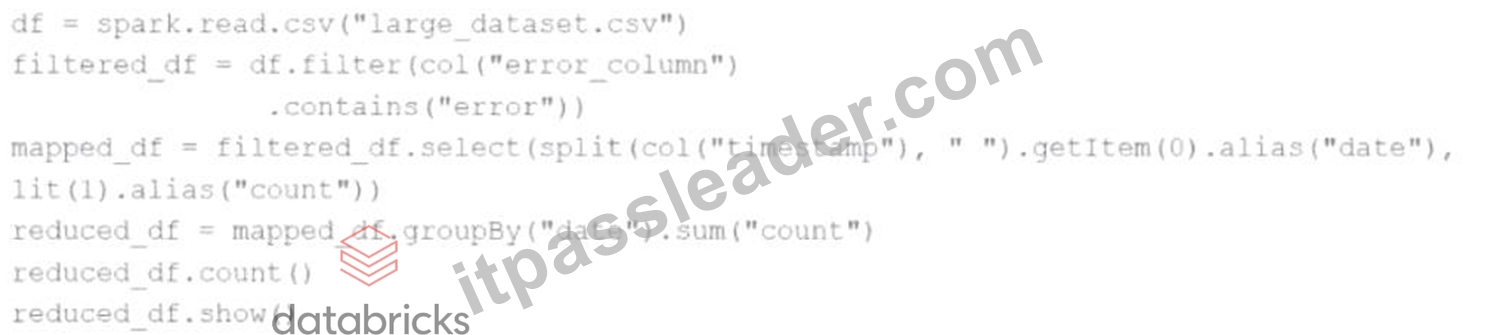
df = spark.read.csv("large_dataset.csv")
filtered_df = df.filter(col("error_column").contains("error"))
mapped_df = filtered_df.select(split(col("timestamp")," ").getItem(0).alias("date"), lit(1).alias("count")) reduced_df = mapped_df.groupBy("date").sum("count") reduced_df.count() reduced_df.show() At which point will Spark actually begin processing the data?
- A. When the filter transformation is applied
- B. When the count action is applied
- C. When the groupBy transformation is applied
- D. When the show action is applied
Answer: B
Explanation:
Spark uses lazy evaluation. Transformations like filter, select, and groupBy only define the DAG (Directed Acyclic Graph). No execution occurs until an action is triggered.
The first action in the code is:reduced_df.count()
So Spark starts processing data at this line.
Reference:Apache Spark Programming Guide - Lazy Evaluation
NEW QUESTION # 92
A data engineer wants to create a Streaming DataFrame that reads from a Kafka topic called feed.
Which code fragment should be inserted in line 5 to meet the requirement?
Code context:
spark \
.readStream \
.format("kafka") \
.option("kafka.bootstrap.servers","host1:port1,host2:port2") \
.[LINE5] \
.load()
Options:
- A. .option("subscribe.topic", "feed")
- B. .option("kafka.topic", "feed")
- C. .option("subscribe", "feed")
- D. .option("topic", "feed")
Answer: C
Explanation:
Comprehensive and Detailed Explanation:
To read from a specific Kafka topic using Structured Streaming, the correct syntax is:
python
CopyEdit
option("subscribe","feed")
This is explicitly defined in the Spark documentation:
"subscribe - The Kafka topic to subscribe to. Only one topic can be specified for this option." (Source:Apache Spark Structured Streaming + Kafka Integration Guide)
B)."subscribe.topic" is invalid.
C)."kafka.topic" is not a recognized option.
D)."topic" is not valid for Kafka source in Spark.
NEW QUESTION # 93
37 of 55.
A data scientist is working with a Spark DataFrame called customerDF that contains customer information.
The DataFrame has a column named email with customer email addresses.
The data scientist needs to split this column into username and domain parts.
Which code snippet splits the email column into username and domain columns?
- A. customerDF = customerDF.withColumn("username", regexp_replace(col("email"), "@", ""))
- B. customerDF = customerDF.withColumn("domain", col("email").split("@")[1])
- C. customerDF = customerDF.select("email").alias("username", "domain")
- D. customerDF = customerDF \
.withColumn("username", split(col("email"), "@").getItem(0)) \
.withColumn("domain", split(col("email"), "@").getItem(1))
Answer: D
Explanation:
The split() function in PySpark splits strings into an array based on a given delimiter.
Then, .getItem(index) extracts a specific element from the array.
Correct usage:
from pyspark.sql.functions import split, col
customerDF = customerDF \
.withColumn("username", split(col("email"), "@").getItem(0)) \
.withColumn("domain", split(col("email"), "@").getItem(1))
This creates two new columns derived from the email field:
"username" → text before @
"domain" → text after @
Why the other options are incorrect:
B: regexp_replace only replaces text; does not split into multiple columns.
C: .select() cannot alias multiple derived columns like this.
D: Column objects are not native Python strings; cannot use standard .split().
Reference:
PySpark SQL Functions - split() and getItem().
Databricks Exam Guide (June 2025): Section "Developing Apache Spark DataFrame/DataSet API Applications" - manipulating and splitting column data.
NEW QUESTION # 94
A data scientist is working with a Spark DataFrame called customerDF that contains customer information. The DataFrame has a column named email with customer email addresses. The data scientist needs to split this column into username and domain parts.
Which code snippet splits the email column into username and domain columns?
- A. customerDF.select(
regexp_replace(col("email"), "@", "").alias("username"),
regexp_replace(col("email"), "@", "").alias("domain")
) - B. customerDF.withColumn("username", substring_index(col("email"), "@", 1)) \
.withColumn("domain", substring_index(col("email"), "@", -1)) - C. customerDF.withColumn("username", split(col("email"), "@").getItem(0)) \
.withColumn("domain", split(col("email"), "@").getItem(1)) - D. customerDF.select(
col("email").substr(0, 5).alias("username"),
col("email").substr(-5).alias("domain")
)
Answer: C
Explanation:
Option B is the correct and idiomatic approach in PySpark to split a string column (like email) based on a delimiter such as "@".
The split(col("email"), "@") function returns an array with two elements: username and domain.
getItem(0) retrieves the first part (username).
getItem(1) retrieves the second part (domain).
withColumn() is used to create new columns from the extracted values.
Example from official Databricks Spark documentation on splitting columns:
from pyspark.sql.functions import split, col
df.withColumn("username", split(col("email"), "@").getItem(0)) \
.withColumn("domain", split(col("email"), "@").getItem(1))
Why other options are incorrect:
A uses fixed substring indices (substr(0, 5)), which won't correctly extract usernames and domains of varying lengths.
C uses substring_index, which is available but less idiomatic for splitting emails and is slightly less readable.
D removes "@" from the email entirely, losing the separation between username and domain, and ends up duplicating values in both fields.
Therefore, Option B is the most accurate and reliable solution according to Apache Spark 3.5 best practices.
NEW QUESTION # 95
......
Download Associate-Developer-Apache-Spark-3.5 Exam Dumps Questions to get 100% Success: https://exam-labs.itpassleader.com/Databricks/Associate-Developer-Apache-Spark-3.5-dumps-pass-exam.html